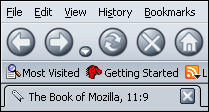
Theme for Mozilla Firefox
- Phoenity Modern for Firefox 2/Firefox 3 is in Mozilla Add-ons.
- I decide to end the development of Phoenity Modern by Firefox 3 compatible version. I hope for someone to take over the development of this theme.
[Firefox 2] If you like Phoenity Modern original Activity Indicator, add the following code to your userChrome.css file. However, you should add this in the first line of your userChrome.css file.
@import url("chrome://global/skin/throbber/throbber.css");
Phoenity Modern original Activity Indicator looks good when arranging it in the rightmost of the Navigation Toolbar.
[Firefox 2] If you don't need the 'Open in Tabs...' menu in the bottom of the Bookmarks submenu, add the following code to your userChrome.css file.
.openintabs-menuseparator,
.openintabs-menuitem {
display: none !important;
}
[Firefox 2/Firefox 3] If you need the Drop-down menu button for the Search Bar, add the following code to your userChrome.css file.
#searchbar .autocomplete-history-dropmarker {
display: -moz-box !important;
-moz-binding: url("chrome://global/content/bindings/autocomplete.xml#history-dropmarker");
}
[Firefox 2] If you feel that the Go button font size is too large, add the following code to your userChrome.css file.
#go-button > .toolbarbutton-text {
font-size: 9pt !important;
}
[Firefox 2/Firefox 3] If you put the button of the extension on the status bar, add the following code to your userChrome.css file.
/* ::::: set the status bar height to 22px ::::: */
#status-bar {
min-height: 22px !important;
font-size: 100% !important;
}
#statusbar-progresspanel {
-moz-box-align: center !important;
}
#statusbar-icon {
margin: 2px 4px !important;
border: 2px solid !important;
-moz-border-top-colors: rgb(137, 151, 161) rgb(199, 208, 217) !important;
-moz-border-right-colors: rgb(224, 236, 246) rgb(199, 208, 217) !important;
-moz-border-bottom-colors: rgb(224, 236, 246) rgb(199, 208, 217) !important;
-moz-border-left-colors: rgb(137, 151, 161) rgb(199, 208, 217) !important;
}
[Firefox 2] If you don't need the Go button, add the following code to your userChrome.css file.
#go-button {
display: none !important;
}
#urlbar-container + #search-container {
-moz-margin-start: 0px !important;
}
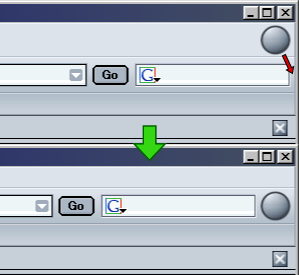
[Firefox 2] If you don't need the Search button, add the following code to your userChrome.css file.
.search-go-button {
display: none !important;
}
#search-container + #urlbar-container {
-moz-margin-start: 0px !important;
}
[Firefox 2/Firefox 3] If you want the Search Bar of fixed width on the Navigation Toolbar, add the following code to your userChrome.css file.
#search-container, #searchbar {
max-width: 15em !important;
}